Memory cards for digital SLR and digital cameras has come a long way with various types in the market. Some have gone the way of digital museums as they are being surpassed and replaced by better memory card formats. One thing they have all in common, is the way you should prepare the card for use with your digital camera.
I had a digital camera that used some old storage media like SmartMedia card which was invented by Fujifilm. This was later replaced by XD card which were smaller and more durable. Even this type of cards has reached the end of its usefulness due to limited support by the masses. Having cards of different media meant that whenever people change cameras or have several cameras, the memory cards that they had could not be used any more due to incompatibility.
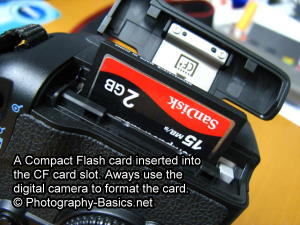 In the end the popular media cards like SD and CF cards were supported by most major brands, because of its mass usage in various digital devices like PDAs and mobile phones. For myself, I tend to avoid camera like Sony, Olympus or Fujifilm even though they may have good camera feature because I would like to have the convenience of interchangeable accessories. Though nowadays Fujifilm camera is now providing support for both XD and SD memory media. Smart move on their part to boost sales.
Anyway, back to the topic of formatting memory cards, you should avoid formatting a memory card on a card reader from a computer. Somehow the format that is used for formatting the card is incompatible with the camera. If you inserted a card into your digital camera formatted from your computer, the camera will not be able to read/write to it and would give you a card error warning.
The best way to go about erasing a card quickly and still retaining the structure necessary for the digital camera to access it is to format the memory media on the digital camera itself.
One guide book I came across recommended formatting the card every time after you have transfer your precious photos to your hard disk in your computer. The idea behind that was that erasing the files were quick, it would retain the file structure of the memory card and help fix any bad sectors in the memory media. Of course you could also erase the files directly from your card reader and there should not be any worry about any ill effects. Should a few files in the memory media start to behave a little oddly, just pop it back in to your digital camera for formatting to remove any bad sector cluster; that should help to solve the problem most of the time.
Another point to note while inserting or removing the memory card from your digital camera is to make sure that the power switch is set to off to avoid possible read/write action which would corrupt the data in the memory media.