The mode dial basic zone is a quick way for taking photography basics pictures. There is no need to fiddle with the ISO, white balance, focus points, shutter speed and aperture f-stop settings. See a scene, select the appropriate basic zone mode, and snap away!
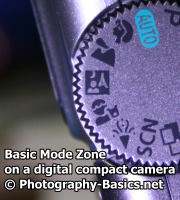 Basic mode zone is available for the Digital SLR photography cameras and for basic point-and-shoot digital compact cameras. The functions are similar except that you can’t change the lens of digital compact cameras to enhance your photography picture taken! In this mode, the digital SLR camera will rendered pictures in jpeg files only.
Full Automatic Mode
For most situations, the Full Auto mode would do the job nicely. There is no need to fuss about any settings. Just point and shoot, just like the compacts!
Portrait Mode
This mode opens the aperture to the widest with lowest f-stop setting to blur the background, so that the portrait subject will stand out in the photo. If you need more background blur you will need lens that are capable of lower f-stop setting eg f2.8 or even f1.8 and of course lens with a greater zoom helps too. In addition some cameras will adjust the colour settings for better skin tone colour in the final picture.
Landscape Mode
In this mode, the aperture is set to smaller iris or higher f-stop number for increased depth of field to capture greater clarity of landscape photograph. To get good landscape photograph, a wide angle lens would be recommended to capture greater breadth of the scenery.
Close up or Macro mode
This mode is not just for taking flowers, but for anything that you need a close-up shot. How close you can get to your subject matter for close-up macro shot will be dependent upon the lens that you mount on your digital SLR (or your model of compact camera in case for point-and-shoot compacts). You can find out the minimum distance you can get to your subject before the camera loses the ability to focus automatically.
Sports Mode
This mode is for capturing fast moving object when you want to freeze action. On a digital SLR, the camera will track the subject and continuously re-focus while you press down on the shutter button.
Night Portrait Mode
For night portrait mode setting, this mode is useful for capturing pictures of people at night or where the lighting is dim. The flash will pop up on the digital SLR (for the compacts, the flash will fire), the shutter speed will be set to a slower speed for slow sync speed to capture more of the background light. You need to keep your hand very steady because of possible camera shake due to the slower shutter speed. A tripod would be recommended when using this mode though you could brace your hands on a solid object like the wall to reduce camera shake.
Flash Off Mode
This is to disable the flash when you are attempting to capture a scene that is rather dim. Using a flash would either make the picture too hot from the flash fire or blot out the warmth of the surrounding light (eg tungsten/halogen indoor light). Also there are times when the flash is not powerful enough to fill in the entire scene due to the distance or depth of the area and where using a slower shutter speed may be better to capture a scene appropriately. Tripod would be recommended to steady the camera for slower shutter speed to avoid possible camera shake in this mode.